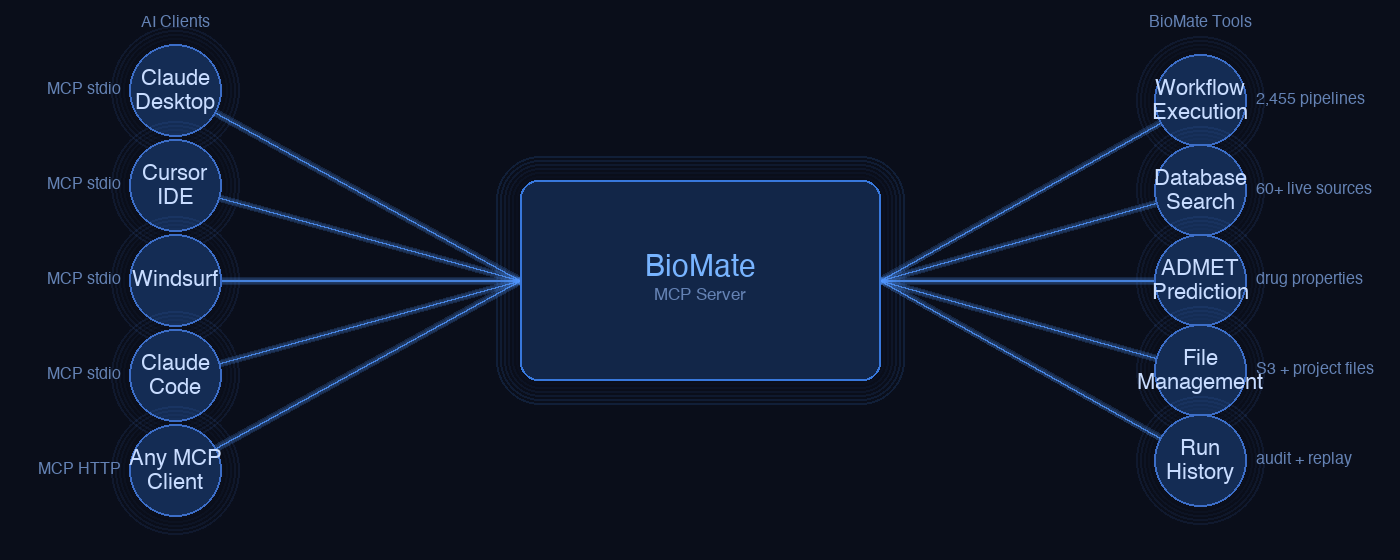
One tool manifest, eight AI surfaces, zero duplicated logic. How we built a connector layer that lets Claude Code, Claude Desktop, Claude Science, Cursor, Codex CLI, ChatGPT, Slack, and Feishu all drive the same biomedical research execution engine.
The problemBiomedical research needs real compute. AI clients need a standard protocol.
Running a DESeq2 analysis or an nf-core/sarek variant-calling pipeline isn't something an AI assistant can do inline. It requires containerised environments, high-memory EC2 instances, reference genome indices, and a Nextflow executor that can orchestrate dozens of steps across AWS Batch workers. BioMate provides that infrastructure — but it needs to be reachable from wherever the researcher already works.
The Model Context Protocol (MCP) gives us a standard way to expose capabilities as typed tools that any compliant AI client can discover and call. The challenge was supporting eight very different surfaces — each with its own transport, auth model, and UX contract — without duplicating the tool logic eight times.
The solution is a single canonical tool manifest and a thin adapter per surface.
Every connector reads its schema from tools_manifest.py and routes
execution through the same dispatch_tool() function that calls
BioMate's REST API. The surfaces diverge only in how they transport the call —
stdio JSON-RPC, Streamable HTTP, REST Actions, or webhook — not in what they do.
Architecture
One manifest, many transports
Green = MCP protocol paths · Grey = REST/webhook paths · Dashed = async / SSE streaming
Design principle
The manifest is the contract
Everything starts with mcp/tools_manifest.py. Each tool is a
ToolSchema dataclass: name, description, JSON Schema input, backend
path, and MCP annotation hints (read_only_hint,
open_world_hint, etc.). The manifest has one job — describe the tools
precisely enough that any surface can render them correctly.
From that manifest, three things are generated automatically:
- MCP stdio tool list — returned verbatim in the
tools/listresponse - OpenAPI paths — one path per tool, consumed by ChatGPT Actions and the Coze plugin
- Remote MCP tool defs — the Streamable HTTP endpoint builds its
Serverfrom the same manifest at startup
Adding a new tool means adding one ToolSchema entry. Every surface
picks it up on next restart, with no changes to adapter code.
The 19-tool surface is defined once. The only per-surface variation is the transport layer
and the scope mapping in remote_mcp/server.py — which OAuth scope is required
to call each tool.
Tools
19 tools across five categories
| Tool | Category | What it does |
|---|---|---|
| biomate_session | Session | End-to-end: natural language → workflow selection → execution → findings. The only tool most users need. |
| search_workflow | Catalog | Semantic search across 2,455 indexed workflows. |
| get_workflow_spec | Catalog | Returns parameter schema for a specific workflow. |
| run_workflow | Execution | Execute a workflow by ID with explicit parameters. Pass stream: true for inline phase/step progress. |
| watch_run | Execution | Stream phase/step progress from a running job until completion. |
| get_run | Execution | Poll status + phases + steps + findings + output files for any run ID. |
| cancel_run | Execution | Cancel a queued or running AWS Batch job. |
| list_runs | Execution | List recent runs with status, workflow name, timestamps. |
| search_literature | Knowledge | Iterative depth-loop across PubMed, EuropePMC, Semantic Scholar, OpenAlex. |
| query_database | Knowledge | Federated fan-out to UniProt, PDB, NCBI Gene, ClinVar, gnomAD, KEGG, ChEMBL, and more. |
| resolve_accession | Knowledge | Identify GEO/SRA/ENA accessions and return the matching BioMate workflow. |
| browse_data | Data | Browse EBI FTP, NCBI FTP, Ensembl, UCSC, or S3 workspace by prefix. |
| fetch_public_data | Data | Stage a public file into the BioMate workspace. |
| upload_file | Data | Get a presigned S3 PUT URL for files >5 MB. |
| preview_file | Output | Return the first N lines / thumbnail of an output file. |
| analyze_results | Output | AI interpretation of run outputs and QC metrics. |
| export_report | Output | Generate and download a PDF/DOCX findings report. |
| explain_error | Output | Diagnose a failed run from its error log. |
| recall_memory | Memory | Retrieve prior runs, validated procedures, and learned preferences for the current user. |
Surfaces
Eight surfaces, two transport families
Every surface routes through the same tool manifest. What differs is how the call arrives — and how the response is presented back to the user.
Claude Code
stdio · JSON-RPC 2.0
The reference implementation. biomate_mcp_server.py is spawned as a child process by Claude Code. No server required — the binary reads stdin, writes stdout. Configuration is two lines in .mcp.json: BIOMATE_API_URL and BIOMATE_API_KEY.
Claude Desktop
stdio · JSON-RPC 2.0
Same stdio transport as Claude Code. The installer writes the server entry into ~/Library/Application Support/Claude/claude_desktop_config.json (macOS) or %APPDATA%\Claude\claude_desktop_config.json (Windows). Restart the app to pick up the new server.
Claude Science
Streamable HTTP · OAuth 2.1 + PKCE
Anthropic's scientific research workbench (launched June 2026) requires HTTPS and a full OAuth 2.1 + PKCE flow for remote MCP endpoints. The remote_mcp/ package handles Dynamic Client Registration, per-user API key issuance, and bearer token validation. Endpoint: dev-public.biomate.ai/mcp.
Cursor
stdio · JSON-RPC 2.0
Cursor's full MCP support (available since late 2025) lets BioMate appear alongside code tools in the IDE. Install via npx @biomate/connect cursor or add it manually in Cursor Settings → MCP. Runs as a stdio child process — same biomate_mcp_server.py binary as Claude Code, zero additional infrastructure.
Codex CLI
stdio · JSON-RPC 2.0
OpenAI's Codex CLI (2026, backed by GPT-5.5) supports MCP over stdio with 90+ community plugins. Run npx @biomate/connect codex to write the server entry into ~/.codex/config.yaml. Once active, Codex can search BioMate workflows, submit Batch jobs, and stream run updates entirely from the terminal.
ChatGPT
REST Actions · OpenAPI 3.1
A Custom GPT calls chatgpt_adapter.py via the OpenAPI Actions schema. The adapter is a thin Flask server that translates ChatGPT's synchronous REST calls into BioMate API calls — including polling biomate_session to completion before returning, since ChatGPT has no streaming transport.
Slack
Webhook · Events API
A Slack bot subscribes to app mentions and slash commands. Messages are forwarded to BioMate's /api/chat/stream SSE endpoint; responses are posted back as threaded replies. Workflow execution updates stream into the thread as the Batch job progresses.
Feishu / Lark
Webhook · Card message API
Same pattern as Slack with Feishu's card message format for structured output. Used by several biotech teams in China where Feishu is the primary enterprise collaboration tool. Supports interactive cards for workflow parameter confirmation before execution.
Get started
Up in two minutes with Claude Code
The fastest path — no OAuth, no server, no ngrok:
1. Get an API key
Log in at biomate.ai → Settings → API Keys → Create key. The key looks like bm_live_….
2. Add to your MCP config
// ~/.mcp.json { "mcpServers": { "biomate": { "command": "npx", "args": ["-y", "@biomate/mcp-server"], "env": { "BIOMATE_API_URL": "https://api.biomate.ai", "BIOMATE_API_KEY": "bm_live_…" } } } }
3. Try it
# In Claude Code You: Run DESeq2 differential expression on the FASTQs in s3://biomate-demo/rnaseq/, treated vs control, GRCh38. Show the top 20 genes when done. # BioMate searches the catalog, selects dss_rnaseq_multifactor_de, # submits to AWS Batch, streams phase updates back via watch_run, # and returns ranked DE genes with log2FC + adjusted p-values.
Dev mode (against a local or staging backend)
// Point at any BioMate instance — no npm package needed { "mcpServers": { "biomate-dev": { "command": "python3", "args": ["/path/to/biomate-connector/mcp/biomate_mcp_server.py"], "env": { "BIOMATE_API_URL": "https://dev-public.biomate.ai", "BIOMATE_API_KEY": "bm_live_…" } } } }
Install guides for all eight surfaces, authentication reference, and the complete tool reference are at biomate.ai/connectors.